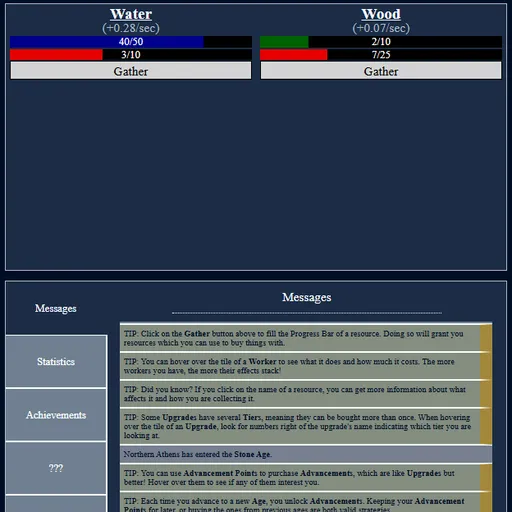

Realm of Ages Clicker is a text-based idle game where you grow a small realm from a single bucket of water. Every resource has its own Gather button and a progress bar that turns clicks into goods. Hire water fetchers and lumberjacks to work for you, then save up for the next age. The realm gets a random name such as Northern Athens, and its story moves from the Stone Age through the Feudal Age, Dark Age and Renaissance.
How to Play Realm of Ages Clicker
Start by buying the free Water upgrade, then press Gather. When the red bar is full you get one unit of water. Each resource also has a storage cap, shown on the blue or green bar above it, so buy storage upgrades when you hit the limit.
Workers and buildings produce resources every second. Workers fill the progress bar for you, while buildings tend to add finished resources directly. Costs rise with each one you own.
Age upgrades are the big milestones. Each one gives an Advancement Point to spend on special research and unlocks new things, from iron in the Feudal Age to trades, leaders and gold later on. The Dark Age even brings a disease crisis that sets you back for a while.
When you have gone far enough, the Prestige menu lets you start a colony. You lose your realm but keep Prestige and Advancement Points.
Realm of Ages Clicker Controls
| Action | Keyboard | Mouse | Touch |
|---|---|---|---|
| Gather a resource | — | Click "Gather" under the resource | Tap "Gather" |
| Buy a worker, building, upgrade or trade | — | Click its tile | Tap its tile |
| See costs and effects | — | Hover over a tile, or click a resource name | Tap a resource name |
| Sell a worker or building | Hold Ctrl | Ctrl + click its tile | — |
| Switch menu panels | — | Click Messages, Statistics, Achievements or Settings | Tap the panel button |
Tips and Strategies
- Click early, automate fast. Gather water by hand only until you can afford Water Fetchers, then let them carry the load.
- Watch the storage cap. Gathering does nothing once a resource is full, so spend or raise the cap before you click more.
- Read tier numbers. Some upgrades can be bought several times, and the tooltip shows which tier you are looking at.
- Balance workers and buildings. The Tax and Property Tax trades pay gold based on how many of each you own.
- Hold off on leaders. You can hire only one leader per colony, and more historical figures unlock as you advance.
- Sell with Ctrl. If a worker costs upkeep you can no longer afford, hold Ctrl and click its tile to sell one.
Features
- Seven resources: water, wood, stone, iron, wheat, silver and diamond, plus gold from trades.
- Ages and advancements: five age upgrades, from the Stone Age to the Age of Revolution.
- Colony prestige with three skill groups and permanent bonuses.
- 36 achievements and a statistics page that tracks your clicks and purchases.
- Eight color themes, autosave, and save export and import.
Tested and updated: