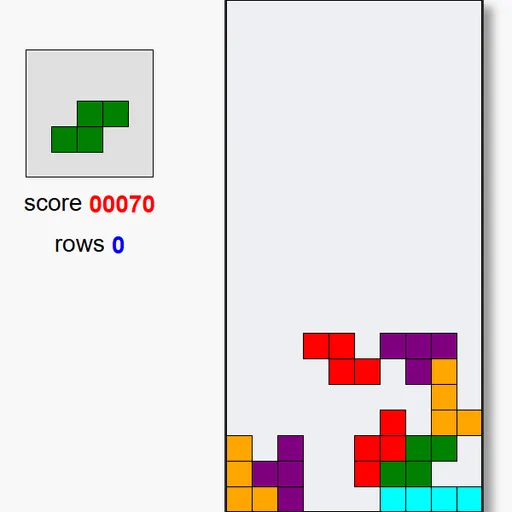
Block Drop is a falling-block puzzle drawn on a single canvas. Shapes made of four squares fall into a court ten blocks wide and twenty tall, and you guide each one into place. Fill a row from wall to wall and it clears, giving you room and points. Jake Gordon wrote this compact version in plain JavaScript and explained it in a blog article, so it is lean: no menus, no sound, just the court, a preview box and a score.
How to Play Block Drop
Press Space or click the start text to begin. A piece appears at the top of the court and falls one row at a time. While it falls you can slide it sideways, rotate it, or push it down faster. When it can fall no further it locks in place, and the next piece, shown in the preview box, enters the court.
Any row that is filled across all ten columns disappears, and everything above it drops down. Your row count and score update on the left. The more rows you have cleared, the faster new pieces fall.
The game ends when a new piece has no room to appear at the top. The start text then returns so you can try again, and Esc ends a run early if you want a fresh start.
Block Drop Controls
| Action | Keyboard | Mouse |
|---|---|---|
| Start a new game | Space | Click "Press Space to Play." |
| Move the piece left or right | Left and Right arrows | — |
| Rotate the piece | Up arrow | — |
| Drop the piece one row faster | Down arrow (hold to keep dropping) | — |
| End the current game | Esc | — |
Tips and Strategies
- Look at the preview first. The box on the left shows the next piece, so plan where both the current and next piece will go.
- Keep the surface flat. Deep, narrow gaps are hard to fill. Aim for a stack with small steps rather than tall towers.
- Save a well for the long bar. Leave one column open along a wall and drop the four-long piece into it to clear four rows for 800 points.
- Rotate early. A piece cannot turn if a wall or block is in the way, so rotate it near the top before you slide it into a tight spot.
- Watch the spawn column. Pieces enter at random spots across the top, so a tall stack anywhere can end the game, not just in the middle.
- Tap Down in short bursts. Each press moves the piece one row, which gives you control without overshooting the spot you want.
Features
- Seven classic shapes, each with its own color.
- Next-piece preview beside the court.
- Rising speed tied to the number of rows you clear.
- Even piece mix: shapes are drawn from a shuffled set with four of each.
- Scales to your window: the court grows in steps to fit the space it has.
Tested and updated: