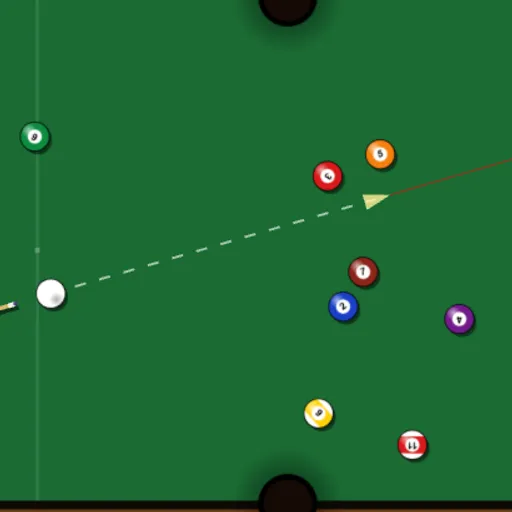
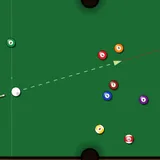
Pocket Pool is a solo billiards challenge on a six-pocket table. You break a full rack of fifteen numbered balls and try to clear every one of them in as few shots as possible. There is no opponent and no turn order, so the only thing you play against is your own best count. Frank Force built it with the LittleJS engine and Box2D physics, which means balls spin, carom off cushions and scatter in a believable way.
How to Play Pocket Pool
Press Play and the rack waits at the far end of the table, with the cue ball on the head string line. Aim, choose your power and strike. The counters at the top track your shots, your best result and how many balls are still on the felt.
A dotted line with an arrow shows the direction and strength of your stroke, and the power percentage appears at the bottom of the screen. A thin red sight line keeps going straight past the arrow. It does not show bounces, so you still have to judge angles yourself.
If the cue ball drops, that is a scratch. Once everything stops, you place the cue ball by hand anywhere on the table that is clear of rails, pockets and other balls. Sink the last numbered ball to see the cleared-table message. If you beat your record, a new best appears too, and R racks up a fresh game.
Pocket Pool Controls
| Action | Keyboard | Mouse | Touch |
|---|---|---|---|
| Aim and set power | — | Point where the cue ball should go; farther from the ball means more power | Press and drag behind the cue ball; pull farther back for more power |
| Shoot | — | Left click | Lift your finger |
| Fine-tune power | — | Scroll the wheel (up adds power, down removes it) | — |
| Fast-forward rolling balls | — | Hold the right button | — |
| Place the cue ball after a scratch | — | Move to a spot and click | Drag to a spot and lift your finger |
| Start a new rack | R | Menu icon, then New Rack | Menu icon, then New Rack |
| Pause | Esc | Click the menu icon (top right) | Tap the menu icon (top right) |
Tips and Strategies
- Hit the break hard. A full-power break spreads the pack and can drop a ball or two, which saves strokes right away.
- Use soft shots near pockets. A gentle tap on a ball sitting in a pocket mouth sinks it without sending the cue ball flying after it.
- Plan the next position. After each shot the balls slow down fast once they crawl, so think about where the cue ball will stop before you strike.
- Turn scratches into chances. Ball in hand lets you set up a straight shot on any ball, so pick the easiest pot on the table.
- Speed up long rolls. Hold the right mouse button while balls coast to get to your next shot sooner.
Features
- Box2D physics: collisions, cushion bounces and ball spin come from a real physics engine.
- Saved best score: your fewest shots for a cleared rack stay in your browser.
- Aim guide: a dotted line, arrow and power readout show what your stroke will do.
- Portrait support: on tall screens the table rotates so it fills the view.
Tested and updated: