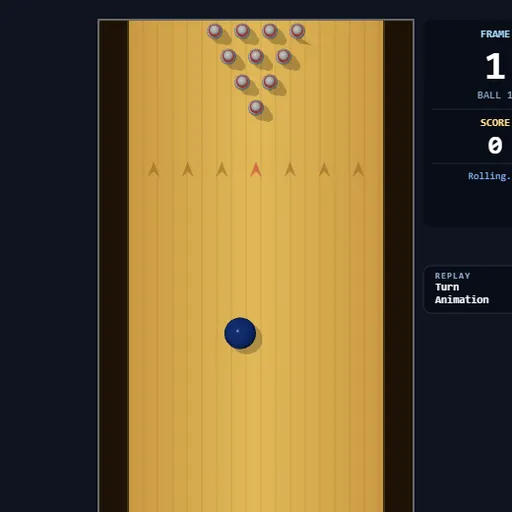
Strike Lane Bowling is a ten-pin bowling game seen from above, with a full ten-frame scorecard along the bottom. Instead of pressing a button to roll, you use the mouse like a bowling arm. You pull back to build power, then flick forward to release, and the way you flick decides the speed, angle and spin. After a strike or a finished frame, a 3D camera replays the shot from the side of the lane.
How to Play Strike Lane Bowling
Click the lane or press Enter to begin. The ball waits behind the red foul line, and moving the mouse slides it left or right to pick your starting spot. When you are lined up, hold Space. Keep holding it, drag the mouse down to fill the power meter, then flick the mouse up quickly to let go.
A faster flick rolls a faster ball, and power makes that flick count for more. Any sideways motion during the flick angles the ball and gives it spin, so it hooks across the lane as it rolls. If the ball touches either edge of the lane, it drops into the gutter and can’t hit any pins.
Scoring follows normal ten-pin rules. A strike is worth 10 plus your next two balls, and a spare is worth 10 plus your next ball. Fallen pins are swept away before your second ball. In frame ten, a strike or spare earns extra balls, and twelve strikes in a row makes a 300 game.
Strike Lane Bowling Controls
| Action | Keyboard | Mouse |
|---|---|---|
| Start or restart a game | Enter | Click the lane |
| Aim (slide the ball left or right) | — | Move left or right while the ball waits at the foul line |
| Charge power | Hold Space | While holding Space, drag down |
| Throw, add angle and hook | Keep holding Space | Flick up fast; drift sideways during the flick to curve it |
| Cancel a charged throw | Esc, or let go of Space | — |
| Turn replays on or off | — | Click the Turn Animation switch |
Tips and Strategies
- Charge fully every time. A strong flick with a low meter still rolls weakly. Pull down until the meter reads close to 100 percent first.
- Make the flick one sharp motion. The throw fires as soon as the mouse starts moving up, so a slow upward drift wastes your power.
- Start straight. A center start with no sideways motion is the easiest shot to repeat. Add hook only after you can hit the head pin on purpose.
- Aim against your hook. If you flick slightly to the right, start the ball a little left of center so its rightward curve carries it into the pins.
- Pick up spares with a straight ball. For one or two leftover pins, slide the ball in line with them and flick straight up.
- Skip replays when practicing. Switch off Turn Animation to throw ball after ball without waiting.
Features
- Flick-to-throw controls: your mouse motion sets speed, angle and hook.
- Full scorecard: ten frames with strike and spare marks and a running total.
- 3D replays: a side camera shows the ball and pins after strikes and finished frames.
- On-screen hints: the side panel shows what to do next at every step of a throw.
Tested and updated: