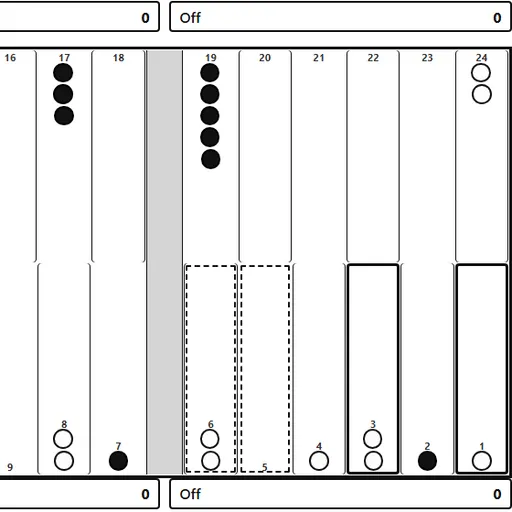
Backgammon is one of the oldest race games still played, and this version keeps the full rules. Each side has 15 checkers that travel in opposite directions around 24 points. Dice decide how far you move, but your choices decide who gets home first. This Backgammon from Christopher Müller’s PaperGames collection lets you face a computer at three levels or a friend on the same screen. It also includes the doubling cube, gammon scoring and a live pip count.
How to Play Backgammon
Black always moves first. Press “Roll dice” to throw two dice, then move checkers by those numbers, one die at a time. A double gives you four moves. You may not land on a point held by two or more enemy checkers. If you land on a point with a single enemy checker, it is hit and goes to the bar.
A checker on the bar must come back in through the other side’s home board before that player may move anything else. The game makes you use as many dice as you can, and the larger die if only one can be played. If nothing is legal, your turn passes.
Once all 15 of your checkers are in your home board, you can start bearing them off with “Off”. The first player to clear every checker wins. A normal win is worth one point, and gammons, backgammons and the cube raise that.
Backgammon Controls
| Action | Keyboard | Mouse | Touch |
|---|---|---|---|
| Roll the dice | Tab to "Roll dice", then Enter | Click "Roll dice" | Tap "Roll dice" |
| Move a checker | Arrow keys to a point, Enter, then arrow to the target and Enter | Click a point with your checker (or the Bar), then the target point | Tap a point with your checker (or the Bar), then the target point |
| Bear off | — | Select the checker, then click "Off" | Select the checker, then tap "Off" |
| Offer a double before rolling | — | Click "Double" | Tap "Double" |
| Undo, resign or show the move list | — | Click "Undo", "Resign" or "Moves" | Tap "Undo", "Resign" or "Moves" |
| Set up a new game | — | Open "Menu", choose "2 Player (local)" or "vs Computer", then "New game" | Open "Menu", choose "2 Player (local)" or "vs Computer", then "New game" |
Tips and Strategies
- Read the pip count. The line under the dice shows how far each side still has to travel, so you know whether you are ahead in the race.
- Avoid leaving lone checkers in range. A single checker within six points of an enemy checker can be hit with one die, which makes it the most exposed.
- Build points in a row. Several held points side by side form a wall that a trapped checker struggles to jump.
- Double when you are clearly ahead. The computer declines when it is far behind on pips, which wins you the current cube value at once.
- Try Hard after Medium feels easy. It plays more safely and leaves fewer checkers open to hits.
Features
- Two ways to play: a computer opponent at Easy, Medium or Hard, or two people on one device.
- Doubling cube: offer doubles, and see who owns the cube and its value.
- Move tools: undo, a scrolling move list and a resign button.
- Adjustable computer speed: fast, normal or slow pauses between its moves.
- Saved games: the board, dice, cube and move list stay in your browser.
Tested and updated: