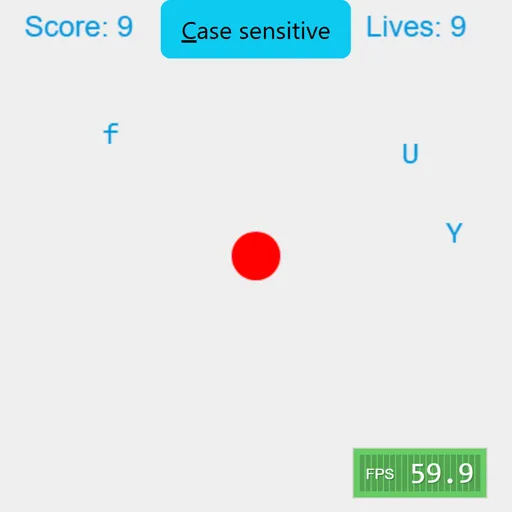
Typer Defense is a quick typing game built around one red circle in the middle of the screen. Single letters slide in from the left and right edges and head straight for it. Press the matching key and the letter bursts into a puff of colored dots. Let one touch the circle and you lose a life. Berk Erol made the original, called Typer, as a small open-source project. There are no words to spell, only fast single-key reactions.
How to Play Typer Defense
Letters appear at random heights along both side edges, and each one moves at its own speed toward the core. Every correct key press removes one letter and adds a point. A key press that matches nothing on screen costs you a point, so mashing the keyboard does not pay.
The game starts in case-sensitive mode. Capital letters only count if you hold Shift, and small letters only count without it. Click the button at the top to switch this off. Only small letters then appear, and Shift no longer matters.
You have 10 lives, shown in the top right corner. When a letter reaches the circle, the screen clears and play continues. The run ends when the last life is lost. The pace stays steady, so the challenge is keeping calm over a long run.
Typer Defense Controls
| Action | Keyboard | Mouse |
|---|---|---|
| Destroy a letter | Press the matching letter key | — |
| Type an uppercase letter | Shift + the letter | — |
| Pause or resume | Esc | — |
| Switch case sensitive on or off | — | Click the "Case sensitive" button |
Tips and Strategies
- Clear the closest letter first. Letters move at different speeds, so a slow one near the edge is less urgent than a fast one halfway in.
- Watch for doubles. When the same letter is on screen twice, a key press removes the newest copy, not the one nearest the core. Press twice to be safe.
- Turn off case sensitivity to learn. Without capitals you can focus on finding keys before adding Shift back.
- Do not guess. A wrong key subtracts a point, so wait until you can read the letter.
- Pause when you need to. Esc freezes everything, which helps when a burst of letters arrives at once.
Features
- Two modes: case sensitive with capitals, or small letters only.
- Ten lives with a full screen reset after each hit.
- Particle bursts in random colors for every letter you clear.
- Resizes to fit the window, with the core always centered.
- Built-in frame meter in the bottom corner.
Tested and updated: