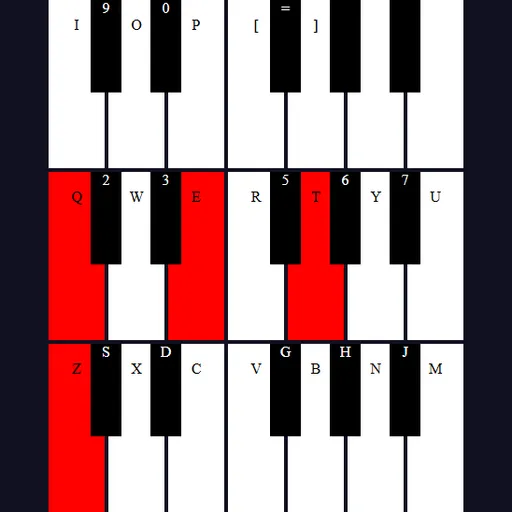
Tiny Synth Piano is a small music toy you can play right away. It shows 36 keys in three stacked rows, one octave per row, with the lowest notes at the bottom. Every sound is built live by your browser rather than loaded from recordings, so it starts instantly. Frank Force first made it under the name 1Keys, a piano written in about one kilobyte of JavaScript. This is his enhanced version, which adds key labels plus octave, key and wave shape controls.
How to Play Tiny Synth Piano
There is no score and no goal, so just make music. Press a letter key and its matching piano key turns red while the note sounds. Let go and the note fades out over a fraction of a second, then the key color eases back.
The bottom row of letters on your keyboard plays the lowest octave. Z is a low C, and the keys above it, like S and D, give you the black notes. The Q row and the number keys above it play the middle octave the same way. The top row continues with I, O, P and the bracket keys.
Pick a voice with the small buttons at the top. The piano icon is an organ sound and is selected when you start. The other buttons give brass, strings, or a single plain tone. The Shape menu changes the wave behind every voice to sine, square, sawtooth or triangle, which ranges from soft to buzzy.
Tiny Synth Piano Controls
| Action | Keyboard | Mouse | Touch |
|---|---|---|---|
| Play notes in the lowest octave | Z S X D C V G B H N J M | — | — |
| Play notes in the middle octave | Q 2 W 3 E R 5 T 6 Y 7 U | — | — |
| Play notes in the top octave | I 9 O 0 P [ = ] | — | — |
| Play or hold any key | — | Press and hold on a key, or drag across keys with the button down | Touch and hold a key |
| Change voice, wave shape, octave or key | — | Click the voice buttons, the Shape menu, or the arrows on Octave and Key | Tap the same controls |
Tips and Strategies
- Try the shapes on one voice. The brass voice with a square wave sounds very different from the same voice on sine, so test one note four ways.
- Use the duplicate keys. The comma, L, period, semicolon and slash keys repeat the first notes of the middle octave, which is handy for fast runs.
- Shift the key instead of learning new fingering. Set Key to a new value and play the same shapes on the keyboard to hear a melody in another key.
- Drop the octave for bass lines. Lowering Octave turns the bottom row into deep tones that pair well with chords on the Q row.
- Glide with the mouse. Hold the button and sweep across the keys to play quick scales.
Features
- Four voices: organ, brass, strings and a plain sine tone.
- Four wave shapes that change the color of every voice.
- Octave and key controls with a range of three octaves and twelve half steps.
- Polyphony: play several notes at once for chords.
- Smooth release that ramps each note down to avoid clicks.
Tested and updated: