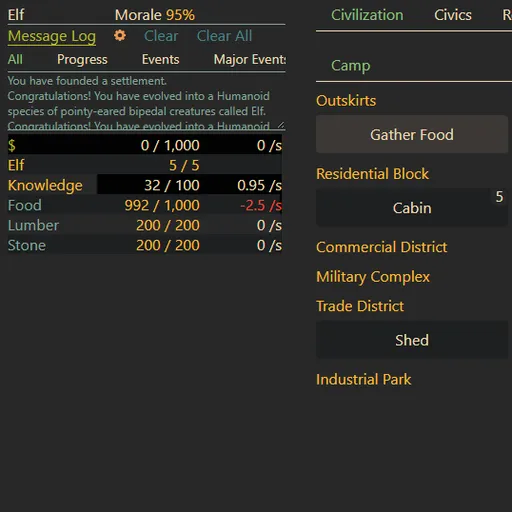
Evolving Civilization is a text-based incremental game that starts with a single cell in the primordial ooze. You click to create RNA, turn it into DNA and evolve one feature at a time until your creature becomes sentient. Then the game turns into a city builder and research tree. You manage food, lumber, stone, jobs and buildings as your camp grows. It is Peter Motschmann’s open-source game Evolve, shown here under a new name, and its later stages lead to space and to resets that make the next run stronger.
How to Play Evolving Civilization
Start by clicking RNA. Once you have some, Form DNA turns 2 RNA into 1 DNA. Spend them on cell parts. Membranes raise your RNA limit, Organelles make RNA on their own, Nuclei turn RNA into DNA, Eukaryotic Cells raise your DNA limit and Mitochondria boost the storage parts.
Next come one-time steps such as Sexual Reproduction. At certain points you choose between branches, like Phagocytosis, Chloroplasts or Chitin. Each path leads to different species and traits. When Sentience appears, buy it to found your civilization.
In the city stage you gather resources by hand at first, then build housing, farms and storage, assign citizens to jobs and unlock research. Each upgrade opens new buildings and tabs. Much later you can trigger resets such as mutual assured destruction, which grant Plasmids that boost production in your next run.
Evolving Civilization Controls
| Action | Keyboard | Mouse | Touch |
|---|---|---|---|
| Gather, build or research | — | Click the action's button | Tap the button |
| Repeat an action 10, 25 or 100 times | Hold Ctrl, Shift or Alt while clicking | — | — |
| Jump to a main tab (press again for its sub-tabs) | Number keys 1 to 7 | Click the tab name | — |
| See costs and effects | — | Hover over a button | — |
| Pause or resume the game | — | Click the pause icon in the top bar | Tap the pause icon |
Tips and Strategies
- Buy RNA makers before storage. Organelles keep producing while you wait, but extra Membranes only help once you can fill them.
- Do not overbuild cheap parts. Each Membrane costs more than the last, so dozens of them drain RNA you need for Nuclei and milestones.
- Use the multi-buy keys. Holding Shift buys or gathers 25 at once, which saves a lot of clicks in the camp stage.
- Read the tooltip before a branch choice. Paths such as Phagocytosis and Chloroplasts are mutually exclusive in a run and decide your species.
- Keep the message log open. Events, discoveries and warnings show up there first, and the filters help you find older ones.
Features
- Two games in one: a cell evolution stage followed by a full civilization and research stage.
- Many species shaped by the evolution path you pick.
- Automatic saving in your browser, plus text export and import in Settings.
- Thirteen interface languages, one of them Pig Latin, selectable in Settings.
- Remappable keys for multi-buy and tab shortcuts.
Tested and updated: