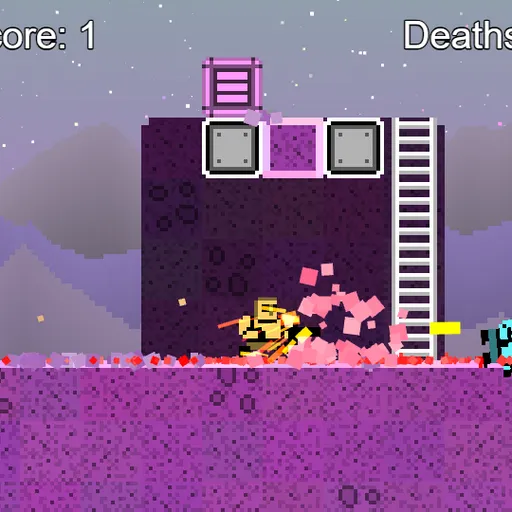
Little Platformer is a pixel-art run-and-gun game set on one wide alien level full of rock, crates and ladders. You carry a gun and can throw a grenade every second, and much of the purple rock can be shot or blown apart. The aim is simple: collect coins, clear out the bouncing creatures, and stay alive. It began as the platformer example inside Frank Force’s open-source LittleJS engine, so it shows off physics, particles and breakable terrain in a small package.
How to Play Little Platformer
Your character starts at the left side of the map. Run, jump and climb ladders to explore. Holding the jump button longer gives a higher leap, and pushing into a wall while falling lets you slide down it and jump off again.
Coins float all over the level, and touching one adds a point. Colorful enemies hop around at random, and touching one is fatal. Shoot an enemy five times to pop it for another point. Crates also break after five hits.
Your bullets chip away at the rock one tile at a time, while gray metal blocks stay put. A grenade beeps for three seconds and then blows a round hole in the level, which is handy for digging shortcuts. Be careful, because the blast can catch you too. A dodge roll spins your character and keeps you safe from harm while it lasts, but it needs two seconds to recharge.
When you die, you return to the start with your score and your changes to the level intact. There is no finish line, so the challenge is to gather everything with as few deaths as possible.
Little Platformer Controls
| Action | Keyboard | Mouse | Touch |
|---|---|---|---|
| Run and climb ladders | Arrow keys or W A S D | — | Left on-screen stick |
| Jump (hold for a higher jump) | Up arrow or W | — | On-screen button |
| Shoot | Z | Hold the left button | On-screen button |
| Dodge roll | X | Right button | On-screen button |
| Throw a grenade | C | Middle button | On-screen button |
| Zoom the camera | — | Scroll wheel | — |
| Restart the level | R | — | — |
Tips and Strategies
- Shoot first, then approach. Enemies need five hits, so start firing while they are still a few steps away.
- Roll through tight spots. The dodge roll protects you, so use it to pass an enemy that lands in your path.
- Dig instead of climbing. A well-placed grenade can open a straight path to coins hidden inside the rock.
- Throw and step back. You have three seconds before the blast, which is enough time to move clear.
- Zoom out to plan. Scroll the mouse wheel to see more of the level and spot coins you missed.
Features
- Destructible terrain: bullets and grenades carve holes in the level that stay for the whole session.
- Wall slides and ladders: climb, slide and kick off walls to reach high ledges.
- Many ways to play: keyboard, mouse, gamepad or an on-screen touch pad.
- Sandbox keys: drop crates, enemies and explosions at the mouse pointer to experiment.
Tested and updated: